Don’t miss out on redeeming all of these active Genesis War Codes, in a guide made by a player for other players. If you want to stay up to date with the latest freebies, whether you need a boost or just don’t want to miss out, you’re in the right place!
Be sure to bookmark this page and check back often for new entries to the list.
So, without further ado, let’s get into the goodies you came for.
Genesis War Codes
This code list is tried and tested as of April 30th, 2026.
Active Reward Codes
- GENESIS0401
- Redeem for: x200,000 Eid, x200 Bit, and x100 Hero’s Bread.
- Expiry date: N/A. This code has no expiry date and can be redeemed once per account for the foreseeable future.
- GRANDOPEN0428
- Redeem for: 5x Destiny Cubes and 5x Omni Cubes.
- Expiry date: 05/05/26
- GWGRANDLAUNCH2026
- Redeem for: TBA
- Expiry date: TBA
How To Retrieve Gift Codes
The process differs depending on your device, so make sure you’re following the correct tutorial to retrieve your rewards.
This is especially important for iOS players, who have a unique way to fetch codes external to the game itself. This may change in the future, but for now, you should comply with the following:
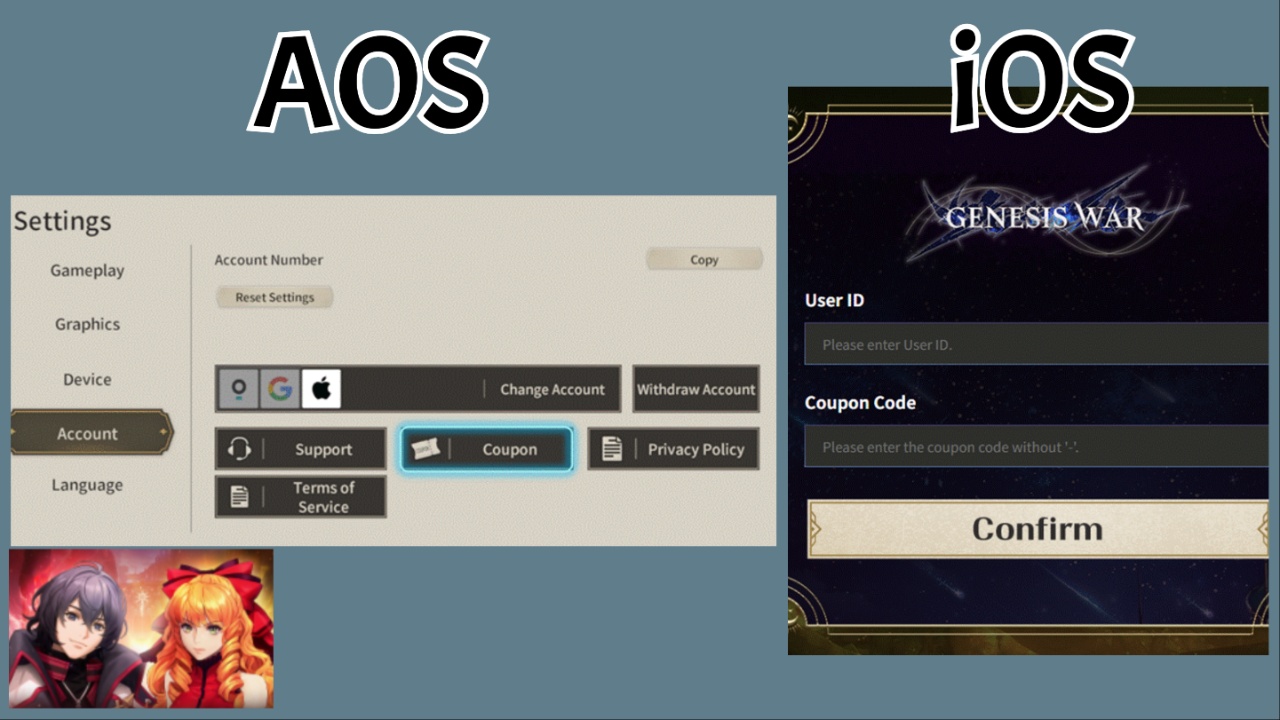
On AOS (Android)
Enter the game, loading into the main game screen. Select the three lines icon in the top right to open the Menu pop-up, from here select Settings and then Coupon.
Insert the code from my list, exactly as shared, and then go claim your rewards from the in-game Mailbox.
On iOS (Apple)
Visit the official Genesis War redemption website.
Insert your User ID, followed by the gift code in the second box. After redemption, return to the main game and claim your rewards via the in-game Mailbox.
To find your User ID, open the Settings Menu in-game and search for the number next to ‘Account‘.
Frequently Asked Questions
- Why won’t my code work when I try to redeem it?
- This can happen for several reasons, including inserting the code incorrectly. Always make sure the codes match, including all capital letters, numbers, special characters, and spaces where applicable. If copying and pasting, ensure there are no accidental spaces at the end of the code when inserting.
- My code isn’t in my mailbox, even though I successfully redeemed it. What happened?
- This can sometimes happen if you don’t retrieve your rewards fast enough, as the Mailbox system only holds onto mail and items for a period of time. Always make sure you immediately claim any codes through the Mailbox after redeeming.
- What were the pre-registration rewards?
- Milestone 50,000: 500,000 Eid
- Milestone 100,000: 500 Bits
- Milestone 200,000: 4x Legendary Armor Box
- Milestone 300,000: 4x Legendary Weapon Box
- Milestone 400,000: 30x Cube of Fate (Destiny Cubes)
- Milestone 500,000: 1x Legendary Character Selection (Crow/Karls)
Start Playing
If you’re not sure how to prioritise all your new currencies and items, I recommend reading my in-depth Genesis War Tier List and Reroll Guide, which helps you know who to prioritise and what teams to build in the early game.
Or, if you’re ready to redeem, start playing Genesis War via its official website.